


Over the past week, I wore my WHOOP through a real-world time change experiment.
I travelled from home in Halifax to Calgary for five days — Atlantic Time to Mountain Time — and watched what happened to my sleep data.
As pilots, we routinely cross time zones.
Our bodies, however, are not nearly as cooperative.
First: How WHOOP Scores Sleep
In the WHOOP app, we see a daily Sleep Score (0–100) representing the quality of the previous night’s sleep.
That score is based on:
Hours slept vs. sleep need
Sleep consistency
Sleep efficiency
Sleep stress
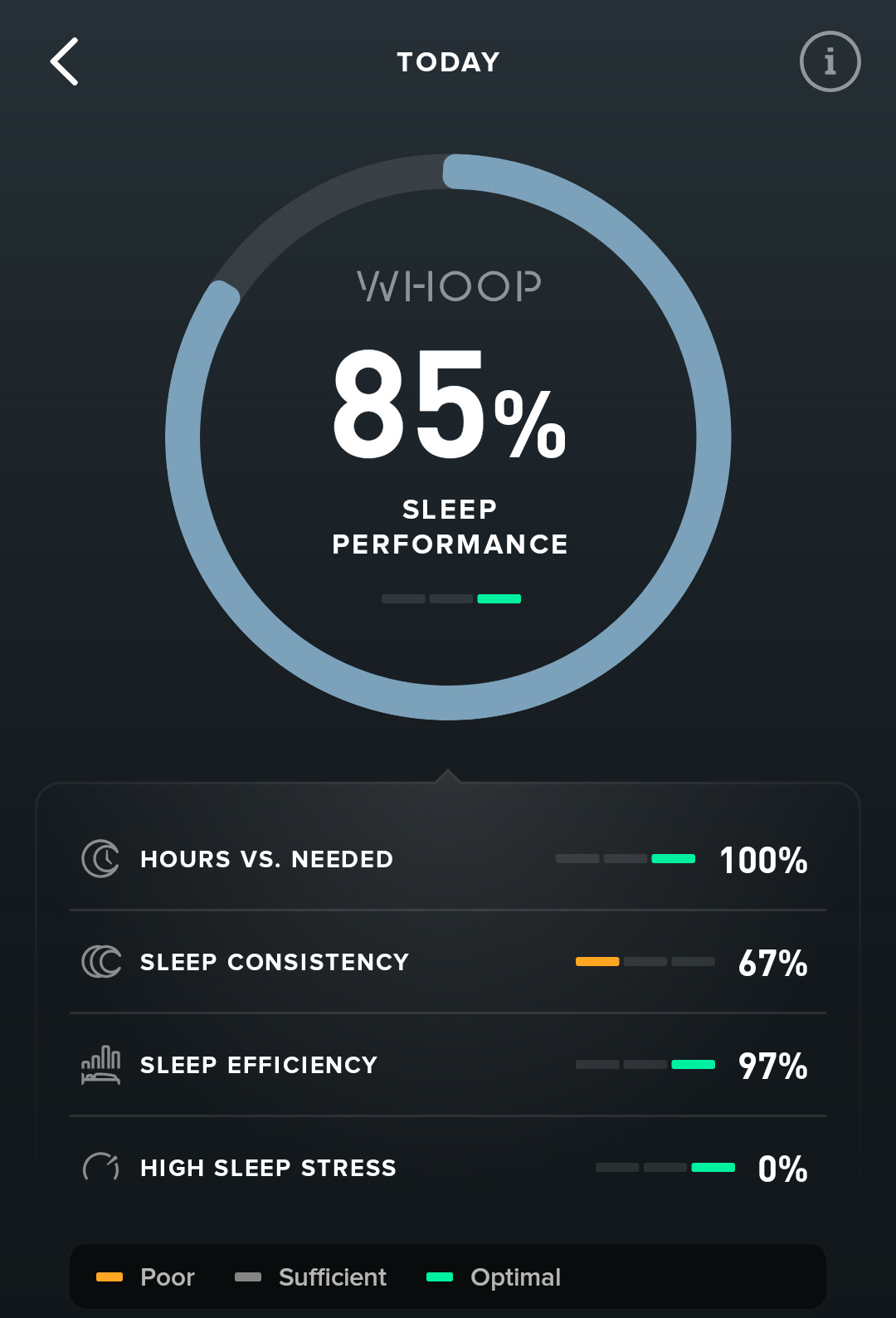
The key thing to understand:
The underlying physiological data never changes. Only the time zone presentation changes.
WHOOP displays your data in whatever time zone your phone is currently set to.
The screenshots below are the exact same sleep data:
On the left: phone set to Calgary time
On the right: phone set to Halifax time
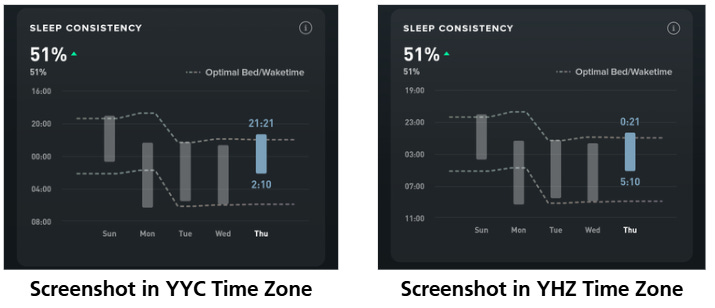
Normally your phone switches automatically when you come out of airplane mode — but I manually changed it to demonstrate this effect.
Your body doesn’t know what time zone you’re in.
Your phone does.
Adjusting in Calgary
Since I was staying in Calgary for four nights — and I wasn’t going to operate on Halifax hours — I adjusted to local time.
Below is my travel day (shown in Calgary time).
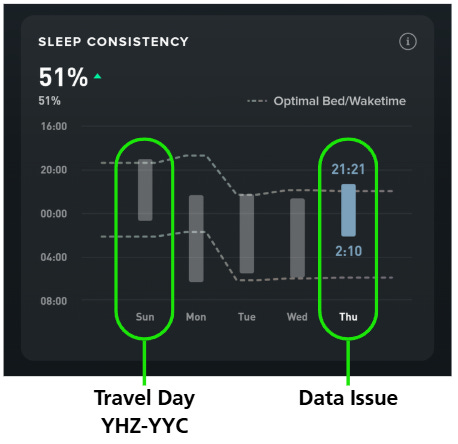
I had an early night before departure, woke early for the flight, then began shifting my sleep to Mountain Time once I arrived.
The grey vertical bars represent sleep periods.
The dotted lines represent suggested optimal bed and wake times.
You’ll notice a dip in those lines Monday night.
That dip reflects a sudden change in sleep timing — not because my physiology changed, but because my sleep shifted relative to my recent history.
Remember:
Your circadian rhythm doesn’t instantly relocate when you land.
The Wednesday Night “Nap” Issue
Something interesting happened Wednesday night into Thursday.
I was exhausted. I went to bed early.
I remember waking around 02:00 and struggling to fall back asleep.
WHOOP recorded the second half of that sleep as a nap, so it doesn’t appear as continuous overnight sleep on that screen.
This is one of the limitations of algorithm-based sleep detection — fragmented sleep can sometimes be categorized differently depending on movement and heart rate patterns.
Back Home: The Catch-Up Sleep
This next chart was taken Saturday in Halifax time.
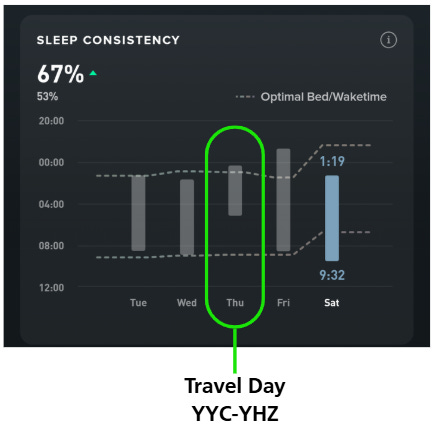
You can clearly see:
The poor Wednesday night
A significant recovery sleep Thursday into Friday
A later sleep Friday into Saturday — similar to my Calgary timing
What I find interesting is how sharply the Optimal Bed/Wake lines jump after that recovery night.
It’s almost as steep as the shift when I first arrived in Calgary.
That surprised me.
Was It My Sleep Goal?
While in Calgary and again once home, I experimented with sleep goals:
Peak Mode
Performance Mode
Get By Mode
Optimize Sleep
Reach My Sleep Need (70/85/100%)
For example:
On Saturday night after my return:
Optimize Sleep suggested bed around 22:50 and wake around 07:30
The blue “Optimal” line suggested roughly 22:20 to 04:50
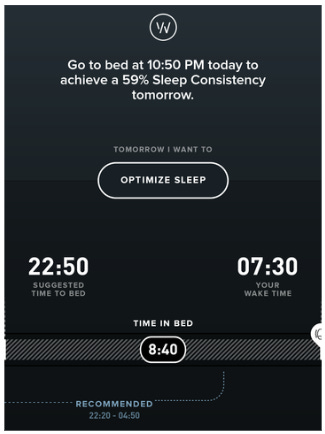
That’s a big difference.
So I asked WHOOP AI Coach to explain it.
When you open “Tonight’s Sleep” / Sleep Planner, you’ll see:
Recommended Time in Bed
Total time WHOOP thinks you should be in bed to hit your selected goal.
It already includes:
Your baseline sleep need (what your body usually needs)
Extra for recent strain
Extra for sleep debt
Minus any recent naps
Your typical sleep latency (how long you take to fall asleep)
Suggested Time to Bed
The actual clock time WHOOP recommends you get into bed tonight.
It’s based on:
Your sleep goal:
Improve My Sleep → prioritizes sleep consistency and gently reduces debt.
Reach My Sleep Need → targets 70/85/100% of tonight’s calculated sleep need.
Your wake-up choice:
If you set a wake time, WHOOP backs bedtime up from there.
If you don’t, WHOOP suggests a wake time that best fits your need + consistency.
Your typical bed/wake times so it doesn’t swing your schedule wildly.
Optimal vs Suggested (blue vs white)
Optimal (blue): “In a perfect world, based only on your physiology and sleep need, this is when you’d sleep.”
Suggested (white): “Given your set alarm/wake time and habits, here’s a realistic bed/wake that balances sleep need + consistency.”
When you change goals or alarm
Switching between Improve My Sleep and Reach My Sleep Need, or changing:
target (70/85/100%)
wake time or alarm type (Exact Time / Sleep Goal / In the Green)
→ WHOOP recalculates:
Recommended Time in Bed
Suggested Time to Bed
Suggested Wake Time
What This Means for Pilots
A few observations:
WHOOP doesn’t “care” about time zones — it cares about physiology.
Presentation depends entirely on phone time zone.
Sleep Planner is heavily influenced by your selected goal.
Fragmented sleep may show up as naps.
Recovery sleep after travel can significantly shift suggested timing.
Being back home allows me to gradually realign with my normal rhythm.
While in Calgary, I focused on:
Maintaining sleep consistency
Maximizing sleep opportunity
Managing sleep debt
That’s the real objective — especially when operating.
The Bigger Experiment
I’m especially curious how WHOOP will respond on longer pairings that cross multiple time zones in short succession.
Atlantic → Europe
Those will be far more disruptive than a simple two or three - hour shift.
I’ll keep tracking.
Because as pilots, we don’t just fly through time zones — we fly through physiology.
You can find all posts in the Flying with WHOOP series here:
👉 https://substack.thomaspaul.ca/t/whoop